Timeline
- April 1, 2026: Physicals submitted after this date are good for the 2026/2027 School Year.
- July 17, 2026: Physical & Final Forms for FALL SPORT ATHLETES must be submitted and approved by this date.
- October 9, 2026: Physical & Final Forms for WINTER SPORT ATHLETES must be submitted and approved by this date.
- February 5, 2027: Physicals & Final Forms for SPRING SPORT ATHLETES must be submitted and approved by this date.
 BCHS Athletics uses FinalForms software for all student-athlete forms and permissions.
Required Paperwork for Participation (No Exceptions)
To participate in official practices, tryouts, scrimmages, and games, all items below must be completed:
- IHSAA Pre-Participation Physical
Must be signed by a physician, nurse practitioner, or physician’s assistant on or after April 1, 2026 (for the 2026/2027 season. - FinalForms (Parent)*
Complete all required online forms, including consent, travel, and code of conduct. - FinalForms (Student Athlete)*
Complete all required online forms
*At least one sport needs to be checked in FinalForms.
How to Check Your Status
Login to FinalForms and look at the Forms Icons color.
- 🟢 Green = Complete
- 🔴 Red = Incomplete
On June 22, 2026, FinalForms resets and rolls all data from the 2025–26 school year into the 2026–27 school year.
What this means for you:
- If you complete your forms before June 22, be sure to select the 2026–27 school year.
- If you accidentally choose the 2025–26 school year, your information will be erased during the reset, and you’ll need to fill everything out again.
Tip: Double-check the selected school year before submitting to avoid extra work later.
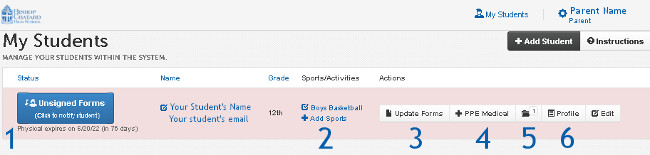
- Log in to your FinalForms account and view your student’s area (figure below).
- Be sure health-related areas are completed for the student. (#3 in figure below)
- Click on #4 PPE Medical and a pre-filled form will be available for printing. (Be patient it may take a moment).
- Take the Physical Examination page to your physical. Have it completed by medical personnel and signed by all parties, to be returned to BCHS.
- The other pre-filled pages can be given to your medical examiner for their records.
- The last page, Release and Consent Certificate, can be discarded. It was completed in Final Forms.
Your completed IHSAA physical form can be uploaded into the Final Forms software or submitted to the Athletic Office.
- Electronic Copy: Scan the document or take a high-quality cell phone photo and upload it to your student’s profile in FinalForms. Use #5 button (see figure below) in the student’s record. Try to give the document a descriptive title with the student’s name and the current year. Thank you!
You can also email the electronic copy to Anne Harless, aharless@bishopchatard.org.
- To submit the paper copy to BCHS: Please bring it to the BCHS Athletic Office. Physical paperwork should not be given to coaches or athletic trainers.
Resources
Questions
- About your physical/form status:
Contact athletics@bishopchatard.org - About FinalForm Software:
Contact FinalFormsHelp@bishopchatard.org

Final Forms: Physicals, Athletics Forms & Communication
One-stop software for parents, students, coaches, our Athletic Trainer, and the Athletics Department.
- Saved Information: Medical and emergency details carry over season-to-season and year-to-year and can be updated at any time.
- Real-Time Access: Updates are immediately available to coaches, athletics staff, and the athletic trainer.
- Communication: Receive email notifications from coaches and the athletic trainer.
- Student Contact Info: Parents enter student emails and phone numbers for coach communication
- Pre-Filled Forms: Download a pre-filled Medical History and Physical Form for use during your physical.
- Easy Upload: Submit your completed physical form directly through the software.
Explore The Software
-
-
- #1 Parents who have signed all their forms can ‘nudge’ their students to complete their part.
- #2 Select ALL the sports your student is interested in. This puts the student on that sport’s list.
- #3 Add or update medical history, emergency contacts, insurance, and consent forms here.
- #4 Download a pre-filled Physical Form to show to your doctor. Be patient this may take a few seconds to display. If this doesn’t work, check that you’ve completed all the medical forms for the student.
- #5 Upload your completed 1-page Physical Exam here.
- #6 The profile area will list any medical notes from the Athletic Trainer
-
Tech Tips
- Use a laptop, desktop, or mobile device rather than a cell phone for the best experience.
- Students can use their BCHS emails in the software.
- Once parent forms are complete, the system automatically emails your student to create his/her account to sign their forms.
- Keep information updated, especially if there is a change in medical or emergency information.
- Parents will receive an email from the system when the Athletic Trainer adds or updates a Medical Note for the student.
- Didn’t get the setup email? Check your spam folder and mark it “Not Spam.” If needed, contact support@finalforms.com